
EVENTRITE
EVENTRITE
EVENTRITE
PRODUCT NAME
PRODUCT NAME
eventrite
eventrite
PROJECT MODE
PROJECT MODE
Personal Project
Personal Project
PLATFORM
PLATFORM
Mobile App
Mobile App
TARGET AUDIENCE
TARGET AUDIENCE
Event Attendees
Event Attendees
Event Organizers
Event Organizers
ROLE
ROLE
Product Designer
Product Designer
TIMELINE
TIMELINE
3 Weeks
3 Weeks

Designing a ticketing experience people can actually trust
Overview
Ticketing platforms have made it easy to discover and purchase events, but they haven’t fully solved the experience. As I looked closer, I noticed that the real issues don’t come from one major flaw, but from small gaps across the journey — lack of clarity before purchase, friction after purchase, and uncertainty at the most critical moment: event entry.
The last time I attended an event, I remember standing at the entrance, scrolling through my email trying to find my ticket while a queue formed behind me. In that moment, it wasn’t just about accessing a QR code — it was about how fragile the entire experience felt. From purchasing the ticket days earlier to that final moment at the gate, there were too many points where things could go wrong.
The goal of this project was to rethink the traditional ticketing experience by focusing on trust, convenience, and flexibility, especially in a market where ticket fraud, poor user experience, and fragmented platforms are common.
The goal of this project was to rethink the traditional ticketing experience by focusing on trust, convenience, and flexibility, especially in a market where ticket fraud, poor user experience, and fragmented platforms are common.
eventrite is a mobile-first ticketing platform that enables users to discover events, purchase secure digital tickets, and manage them seamlessly within a single ecosystem.
eventrite is a mobile-first ticketing platform that enables users to discover events, purchase secure digital tickets, and manage them seamlessly within a single ecosystem.
Understanding the Problem
Buying a ticket should be simple. It’s something people do all the time — whether it’s for a concert, a conference, or a social event. But as I reflected on my own experiences and observed how others interact with ticketing platforms, I realised that the process often feels more fragile than it should. Not because it’s difficult to use, but because there’s a subtle layer of uncertainty at almost every stage.
Before purchasing, users are often trying to make decisions with incomplete clarity. They’re unsure about what the event truly offers, what each ticket tier includes, or whether there are restrictions they should be aware of.
During purchase, especially for high-demand events, the experience can feel rushed. Users move quickly through the flow, but not always confidently. And after the purchase which should ideally feel like the end of the journey, new problems begin to surface. Tickets get buried in emails, users rely on screenshots as backups, transferring tickets becomes unclear or unreliable.
Buying a ticket should be simple. It’s something people do all the time — whether it’s for a concert, a conference, or a social event. But as I reflected on my own experiences and observed how others interact with ticketing platforms, I realised that the process often feels more fragile than it should. Not because it’s difficult to use, but because there’s a subtle layer of uncertainty at almost every stage.
Before purchasing, users are often trying to make decisions with incomplete clarity. They’re unsure about what the event truly offers, what each ticket tier includes, or whether there are restrictions they should be aware of.
During purchase, especially for high-demand events, the experience can feel rushed. Users move quickly through the flow, but not always confidently. And after the purchase which should ideally feel like the end of the journey, new problems begin to surface. Tickets get buried in emails, users rely on screenshots as backups, transferring tickets becomes unclear or unreliable.
At first glance, ticketing seems like a solved problem. There are already established platforms like Ticketmaster and Eventbrite. But as I looked closer, I noticed a pattern: The experience works but it doesn’t feel reliable, flexible, or user-first.
At first glance, ticketing seems like a solved problem. There are already established platforms like Ticketmaster and Eventbrite. But as I looked closer, I noticed a pattern: The experience works but it doesn’t feel reliable, flexible, or user-first.
Users need a ticketing experience that goes beyond just purchasing. One that builds trust, provides clarity at every stage, and supports them even after the transaction is complete.
Users need a ticketing experience that goes beyond just purchasing. One that builds trust, provides clarity at every stage, and supports them even after the transaction is complete.
My Role
In this project, I worked as a Product Designer, but more importantly, I took ownership of the entire product thinking process. I defined the problem, structured the experience, designed the key user flows, and made decisions around how the product should behave — not just how it should look.
At every stage, I focused on making sure my decisions were grounded in: real user needs, realistic product constraints and clear reasoning.
In this project, I worked as a Product Designer, but more importantly, I took ownership of the entire product thinking process. I defined the problem, structured the experience, designed the key user flows, and made decisions around how the product should behave — not just how it should look.
At every stage, I focused on making sure my decisions were grounded in: real user needs, realistic product constraints and clear reasoning.
How I Approached the Problem — Designing with real user behaviour in mind
Once I had a clearer understanding of where the experience was breaking down, I knew I didn’t want to jump straight into designing screens. I wanted to understand how people actually experience ticketing in real life — not just how the flow looks on paper, but how it feels when they’re using it.
So I started by speaking to a small group of users who regularly attend events — concerts, tech meetups, and social gatherings. I spoke with 6 participants between the ages of 22 and 35, including people like Tolu (a product manager), Amaka (a freelancer who attends events frequently), and David (a software engineer who travels for events).
Instead of asking direct UX questions, I asked them to walk me through the last time they bought and used a ticket. What stood out to me wasn’t just what they did — it was where they hesitated.
Tolu mentioned that he often double-checks if a ticket is legitimate, especially when it’s not directly from the organiser. Amaka shared that she has, on multiple occasions, arrived at events not fully understanding what her ticket actually included. David talked about the stress of searching through his email at the venue entrance, trying to find the right ticket while people waited behind him. Even in cases where the flow technically worked, there was a consistent feeling of uncertainty.
Across these conversations, a few patterns became very clear. Most users didn’t struggle with using ticketing platforms — they struggled with trusting them. There was uncertainty before purchase, friction after purchase, and anxiety at the most critical moment — event entry.
Once I had a clearer understanding of where the experience was breaking down, I knew I didn’t want to jump straight into designing screens. I wanted to understand how people actually experience ticketing in real life — not just how the flow looks on paper, but how it feels when they’re using it.
So I started by speaking to a small group of users who regularly attend events — concerts, tech meetups, and social gatherings. I spoke with 6 participants between the ages of 22 and 35, including people like Tolu (a product manager), Amaka (a freelancer who attends events frequently), and David (a software engineer who travels for events).
Instead of asking direct UX questions, I asked them to walk me through the last time they bought and used a ticket. What stood out to me wasn’t just what they did — it was where they hesitated.
Tolu mentioned that he often double-checks if a ticket is legitimate, especially when it’s not directly from the organiser. Amaka shared that she has, on multiple occasions, arrived at events not fully understanding what her ticket actually included. David talked about the stress of searching through his email at the venue entrance, trying to find the right ticket while people waited behind him. Even in cases where the flow technically worked, there was a consistent feeling of uncertainty.
Across these conversations, a few patterns became very clear. Most users didn’t struggle with using ticketing platforms — they struggled with trusting them. There was uncertainty before purchase, friction after purchase, and anxiety at the most critical moment — event entry.
How can I design a ticketing experience that users can trust at every stage — not just during the transaction?
How can I design a ticketing experience that users can trust at every stage — not just during the transaction?
Translating Insights into User Stories
After clearly defining the problem space and identifying trust, clarity, and flexibility as the core gaps in the ticketing experience, I needed a way to translate these insights into actionable design decisions. Rather than jumping straight into features, I grounded my thinking in user stories.
To maintain consistency with my earlier approach, I mapped user stories across the three key phases I had already defined:
Discovery
Purchase
Ownership (post-purchase experience)
This ensured that I wasn’t just solving isolated problems, but designing a complete end-to-end experience.
After clearly defining the problem space and identifying trust, clarity, and flexibility as the core gaps in the ticketing experience, I needed a way to translate these insights into actionable design decisions. Rather than jumping straight into features, I grounded my thinking in user stories.
To maintain consistency with my earlier approach, I mapped user stories across the three key phases I had already defined:
Discovery
Purchase
Ownership (post-purchase experience)
This ensured that I wasn’t just solving isolated problems, but designing a complete end-to-end experience.
As a user, I want to filter events based on my location, interests, date, category, and price, so that I can narrow down my options without feeling overwhelmed.
As a user, I want to filter events based on my location, interests, date, category, and price, so that I can narrow down my options without feeling overwhelmed.
As a user, I want to clearly understand different ticket tiers and their benefits, so that I can choose the best option for my needs.
As a user, I want to clearly understand different ticket tiers and their benefits, so that I can choose the best option for my needs.
As a user, I want to access all my tickets in one place, so that I don’t have to search through emails or messages.
As a user, I want to access all my tickets in one place, so that I don’t have to search through emails or messages.
SOLUTIONS (UI DESIGNS)
Instead of just listing features, I focused on why each solution exists and what problem it solves. I designed solutions based on core user flows and product requirements. Rather than trying to solve everything at once, I focused on the most important use cases that defines how the user discovers the events, purchase their tickets, manage their tickets, handling tickets transfer and resale.
Instead of just listing features, I focused on why each solution exists and what problem it solves. I designed solutions based on core user flows and product requirements. Rather than trying to solve everything at once, I focused on the most important use cases that defines how the user discovers the events, purchase their tickets, manage their tickets, handling tickets transfer and resale.
Event discovery
I designed the Event Discovery experience to feel relevant and intentional, rather than overwhelming. Instead of presenting users with a long, unstructured list of events, I introduced filtering based on location, category, date, and price, allowing users to quickly narrow down options that actually fit their interests.
Users can select the types and kinds of events they want to see and we will recommend these events to the users based on preferences. The reason behind this was simple: users don’t want more options, they want better options.
By making discovery more contextual and personalised, I reduced the effort required to find something meaningful. This makes the experience feel lighter, faster, and more aligned with what the user is actually looking for.
I designed the Event Discovery experience to feel relevant and intentional, rather than overwhelming. Instead of presenting users with a long, unstructured list of events, I introduced filtering based on location, category, date, and price, allowing users to quickly narrow down options that actually fit their interests.
Users can select the types and kinds of events they want to see and we will recommend these events to the users based on preferences. The reason behind this was simple: users don’t want more options, they want better options.
By making discovery more contextual and personalised, I reduced the effort required to find something meaningful. This makes the experience feel lighter, faster, and more aligned with what the user is actually looking for.

Event details page
This was one of the most important parts of the product for me. I intentionally treated the event details page not as a static screen, but as a conversion-focused decision layer. Users don’t abandon ticket purchases because the UI looks bad, they abandon because they are uncertain. I introduced clearly structured sections for event descriptions, schedules, venue details, ticket tiers, and policies. Making sure everything feels transparent and easy to scan.
This reduces uncertainty at the most important decision point. Instead of users second-guessing themselves, the experience guides them toward clarity. And when users feel informed, they’re far more likely to move forward with confidence.
This was one of the most important parts of the product for me. I intentionally treated the event details page not as a static screen, but as a conversion-focused decision layer. Users don’t abandon ticket purchases because the UI looks bad, they abandon because they are uncertain. I introduced clearly structured sections for event descriptions, schedules, venue details, ticket tiers, and policies. Making sure everything feels transparent and easy to scan.
This reduces uncertainty at the most important decision point. Instead of users second-guessing themselves, the experience guides them toward clarity. And when users feel informed, they’re far more likely to move forward with confidence.

Ticket purchase flow
I designed the purchase flow to feel fast, clear, and uninterrupted. Because, the process of buying ticket is often a high-pressured moment for the user as they are trying to act quickly, but they also want to be sure they’re making the right choice.
I reduced unnecessary steps, kept ticket information visible throughout the process, and ensured that users could move from selection to payment without distractions. By simplifying the flow and removing cognitive overload, I made it easier for users to complete their purchase without second-guessing or dropping off midway.
I designed the purchase flow to feel fast, clear, and uninterrupted. Because, the process of buying ticket is often a high-pressured moment for the user as they are trying to act quickly, but they also want to be sure they’re making the right choice.
I reduced unnecessary steps, kept ticket information visible throughout the process, and ensured that users could move from selection to payment without distractions. By simplifying the flow and removing cognitive overload, I made it easier for users to complete their purchase without second-guessing or dropping off midway.

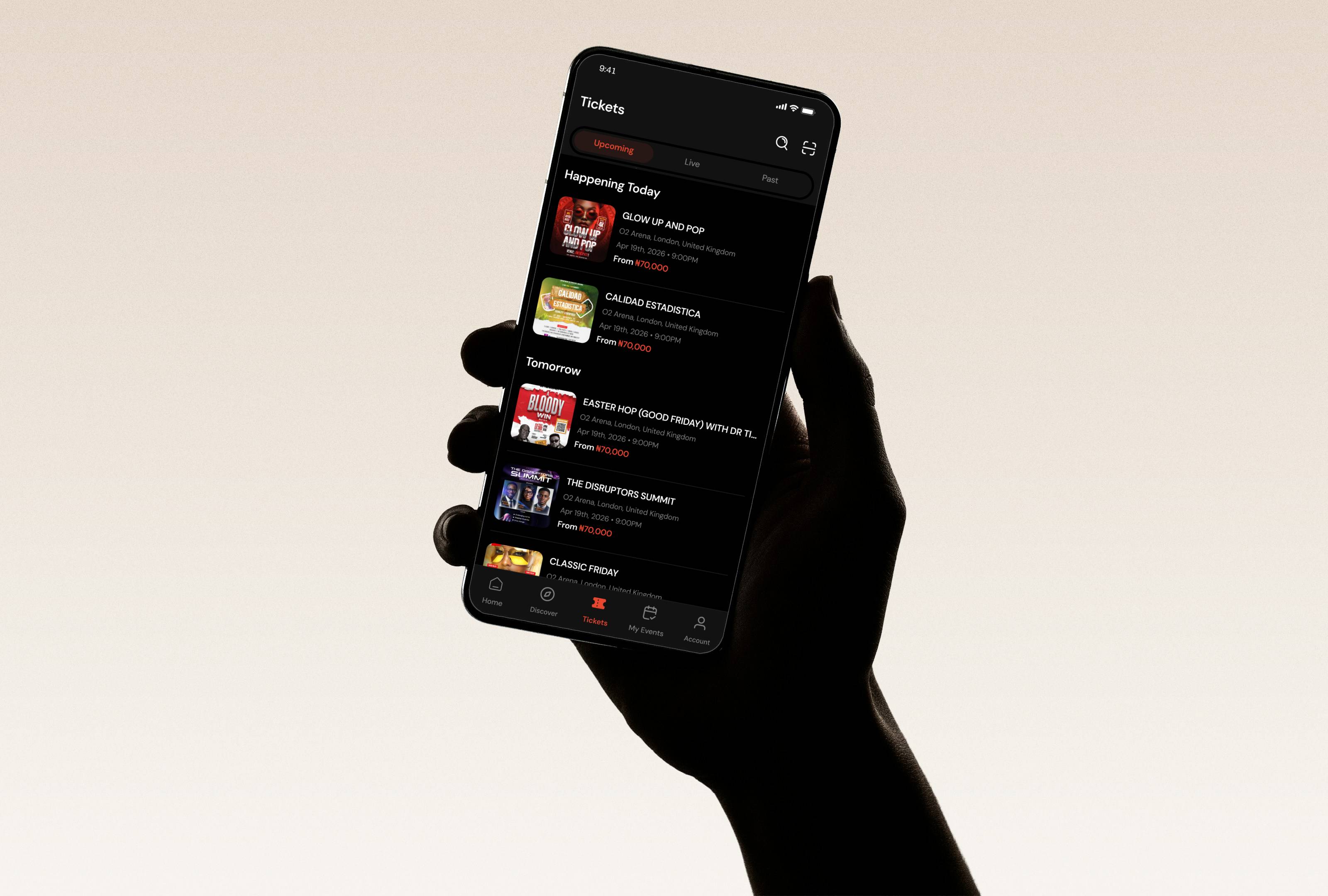
Tickets screen
One of the biggest gaps I noticed in existing platforms was what happens after purchase. Tickets often live in emails, screenshots, or scattered confirmations — which creates unnecessary stress, especially at the venue.
So I designed the Tickets screen as a centralised ticket wallet, where users can access all their tickets in one place. Each ticket is presented clearly with a secure QR code, event details, and status (active or used). This removes the need to search through emails or rely on external storage.
One of the biggest gaps I noticed in existing platforms was what happens after purchase. Tickets often live in emails, screenshots, or scattered confirmations — which creates unnecessary stress, especially at the venue.
So I designed the Tickets screen as a centralised ticket wallet, where users can access all their tickets in one place. Each ticket is presented clearly with a secure QR code, event details, and status (active or used). This removes the need to search through emails or rely on external storage.

Tickets ownership transfer flow
Real life doesn’t always go as planned. People change schedules, make mistakes, or simply can’t attend events anymore. So I knew flexibility had to be part of the experience but it also had to be handled carefully. I designed a controlled ticket transfer flow that allows users to securely transfer tickets within the app. Instead of informal or risky sharing methods, the system ensures that ownership is clearly reassigned once the recipient accepts the transfer.
The key here was balancing flexibility with security. Users get the freedom to adapt when plans change, but without introducing risks like duplicated or invalid tickets. This not only improves usability, but also strengthens trust in the system as a whole.
Real life doesn’t always go as planned. People change schedules, make mistakes, or simply can’t attend events anymore. So I knew flexibility had to be part of the experience but it also had to be handled carefully. I designed a controlled ticket transfer flow that allows users to securely transfer tickets within the app. Instead of informal or risky sharing methods, the system ensures that ownership is clearly reassigned once the recipient accepts the transfer.
The key here was balancing flexibility with security. Users get the freedom to adapt when plans change, but without introducing risks like duplicated or invalid tickets. This not only improves usability, but also strengthens trust in the system as a whole.

Results & Impacts
Although this is a conceptual project, every decision was designed with measurable outcomes in mind.
For Attendees: the experience becomes more trustworthy, easier to navigate and more flexible.
For Organizers: it means fewer fraudulent tickets, faster entry process and better attendees satisfaction.
And from a product perspective, this would likely lead to: higher conversion rate, lower support requests, and stronger user retention.
Although this is a conceptual project, every decision was designed with measurable outcomes in mind.
For Attendees: the experience becomes more trustworthy, easier to navigate and more flexible.
For Organizers: it means fewer fraudulent tickets, faster entry process and better attendees satisfaction.
And from a product perspective, this would likely lead to: higher conversion rate, lower support requests, and stronger user retention.
Conclusion
This project pushed me to think beyond interfaces and really focus on how products make people feel at every stage of an experience.
One of the biggest takeaways for me was realising that in products like this, users aren’t just interacting with features — they’re making decisions that involve time, money, and expectations. And when those stakes are high, good design isn’t just about usability, it’s about reducing doubt and building confidence.
Throughout this process, I found myself constantly asking:
Does this help the user feel more certain?
Does this reduce friction or add to it?
Does this solve a real problem or just look good?
Those questions helped me stay grounded and intentional in every decision I made.
This project pushed me to think beyond interfaces and really focus on how products make people feel at every stage of an experience.
One of the biggest takeaways for me was realising that in products like this, users aren’t just interacting with features — they’re making decisions that involve time, money, and expectations. And when those stakes are high, good design isn’t just about usability, it’s about reducing doubt and building confidence.
Throughout this process, I found myself constantly asking:
Does this help the user feel more certain?
Does this reduce friction or add to it?
Does this solve a real problem or just look good?
Those questions helped me stay grounded and intentional in every decision I made.
Next Steps
If I continued working on this product, I would focus on making the experience even more dynamic.
Introducing a Waitlist System: To handle sold-out events and maintain engagement.
Personalised Event Recommendations: To improve discovery and relevance over time.
Social Features: To allow users to see events their friends are atttending
Offline Ticket Access: To ensure users can access tickets without internet connectivity.
Organizer Tools: To provide dashboards for ticket sales analytics, audience insights and event performance tracking
If I continued working on this product, I would focus on making the experience even more dynamic.
Introducing a Waitlist System: To handle sold-out events and maintain engagement.
Personalised Event Recommendations: To improve discovery and relevance over time.
Social Features: To allow users to see events their friends are atttending
Offline Ticket Access: To ensure users can access tickets without internet connectivity.
Organizer Tools: To provide dashboards for ticket sales analytics, audience insights and event performance tracking

MORE WORKS

2025
Mobile App
Eventrite - webapp
Mobile-first ticketing platform that enables users to discover events, purchase secure digital tickets.

2025
Mobile App
Ridely
Web-based event creation and management platform for organizers to plan, launch, and actively manage events in real-time.
2026
Mobile App
In Progress
Recruitly
Mobile-first AI-powered gamified experience job applicants.
Let's connect
UX DESIGN
PRODUCT DESIGN
UI DESIGN
Designs
Contacts
Let's connect
UX DESIGN
PRODUCT DESIGN
UI DESIGN
Designs
Contacts
Let's connect
UX DESIGN
PRODUCT DESIGN
UI DESIGN
Designs
Contacts
Let's connect
UX DESIGN
PRODUCT DESIGN
UI DESIGN
Designs
Contacts